Harvest Curly: A Handwritten Font for Casual and Cozy Designs
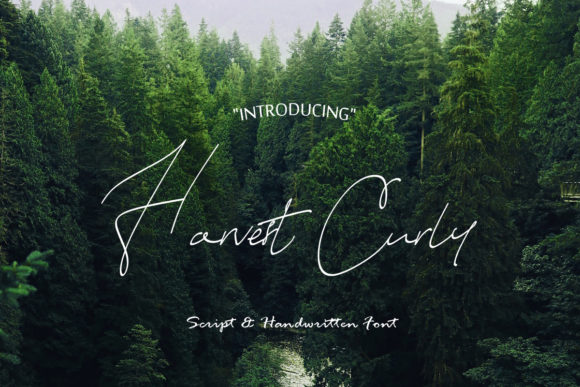
Harvest Curly is a beautiful handwritten font that brings warmth and personality to any design. Its soft, flowing curves and friendly appearance make it perfect for projects that need a casual, homey feel. Whether you're creating social media posts, invitations, or branding materials, Harvest Curly can add a unique touch that stands out from more formal typefaces.
However, like any design tool, Harvest Curly has its nuances. Choosing the right font for your project can be tricky, especially if you're not familiar with how different styles affect readability, aesthetics, and overall impact. Here are some practical tips and common mistakes to avoid when using Harvest Curly in your work.
Why Harvest Curly Stands Out
Handwritten fonts have a special charm that digital fonts often lack. Harvest Curly captures this essence with its natural, organic look. It’s ideal for designs that aim to feel personal, approachable, and slightly rustic. This makes it a popular choice among bloggers, small business owners, and content creators who want their brand to feel more human and less corporate.
One of the biggest advantages of Harvest Curly is its versatility. It works well for both print and digital formats, including logos, quotes, headers, and even body text in certain contexts. However, knowing when and where to use it effectively is key to achieving the best results.
Common Mistakes When Using Harvest Curly
While Harvest Curly is visually appealing, it's easy to misapply it, which can lead to poor readability or an unprofessional appearance. Here are a few common pitfalls to watch out for:
- Using it for long paragraphs: Harvest Curly is best suited for short phrases or headings. Using it for lengthy blocks of text can reduce readability and make your content harder to follow.
- Ignoring spacing and alignment: The irregularity of a handwritten font can throw off the visual balance of a design. Paying attention to letter spacing, line height, and alignment helps maintain a clean and professional look.
- Mixing it with incompatible fonts: Combining Harvest Curly with other fonts that have very different styles can create a cluttered or confusing design. Stick to fonts that share similar characteristics or use it as a contrast element carefully.
- Overusing it: While Harvest Curly adds character, using it too frequently can make your design look inconsistent or unpolished. Use it strategically to highlight key elements rather than applying it everywhere.
How to Use Harvest Curly Effectively
To get the most out of Harvest Curly, consider the following best practices:
- Use it for emphasis: Apply Harvest Curly to titles, headings, or call-to-action buttons to draw attention without overwhelming the viewer.
- Pair it with a complementary sans-serif font: For body text, pair Harvest Curly with a clean, modern sans-serif font like Arial or Helvetica. This combination offers a nice contrast while maintaining readability.
- Test it on different backgrounds: The legibility of Harvest Curly can vary depending on the background color or texture. Always test your design on multiple surfaces to ensure it looks good in all contexts.
- Adjust spacing and size: Since Harvest Curly has a more organic feel, adjusting the letter spacing and font size can help improve its clarity and visual appeal.
What to Check Before Using Harvest Curly
Before incorporating Harvest Curly into your design, there are a few things to consider:
- Licensing: Ensure that you have the proper license to use the font in your project. Some fonts may have restrictions on commercial use or require attribution.
- Compatibility: Check that Harvest Curly works across all platforms and devices you plan to use it on. Some fonts may not render correctly on mobile screens or in certain browsers.
- File format: Download the font in the appropriate file format (e.g., .ttf, .otf) based on your design software and operating system.
- Font quality: Look for high-quality versions of Harvest Curly to avoid pixelation or distortion, especially when scaling the font up or down.
Real-World Examples of Harvest Curly in Action
Let’s say you’re designing a blog post about cozy living. Using Harvest Curly for the title and subheadings can give your content a warm, inviting feel that matches the theme. Pair it with a simple sans-serif font for the body text, and you’ll have a balanced and aesthetically pleasing layout.
Another example is a small bakery’s website. Harvest Curly could be used for the menu items or promotional banners, adding a personal touch that reflects the artisanal nature of the business. Just be sure to keep the text concise and readable to maintain professionalism.
Conclusion
Harvest Curly is a versatile and charming font that can elevate your designs with its casual, handwritten style. By understanding its strengths and limitations, you can use it effectively to enhance your projects without compromising readability or professionalism. Avoid common mistakes by using it thoughtfully, pairing it wisely, and ensuring it aligns with your overall design goals. With the right approach, Harvest Curly can become a valuable asset in your creative toolkit.