Sketch Hand Drawn: A Versatile Tool for Creative and Professional Workflows
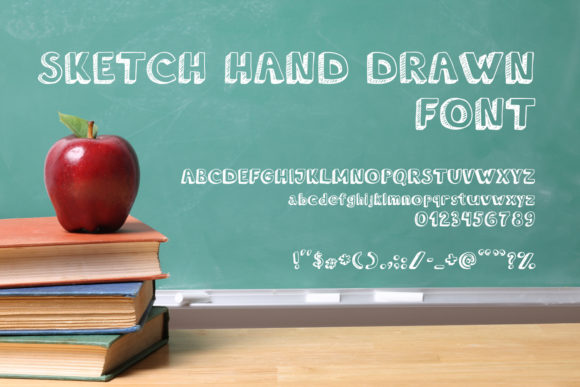
Sketch Hand Drawn is a handwritten font that brings a personal, artistic touch to any project. Designed to mimic the natural flow of human handwriting, this font offers a unique blend of elegance and informality. Whether you're creating marketing materials, designing presentations, or adding a personal flair to digital content, Sketch Hand Drawn can enhance your work with its organic feel.
Understanding Sketch Hand Drawn
Sketch Hand Drawn is more than just a font—it's a creative asset that adds character and warmth to text. Unlike standard fonts, which are often uniform and structured, Sketch Hand Drawn mimics the irregularities of real handwriting. This makes it ideal for projects where a personal or handcrafted look is desired.
This font is particularly useful in situations where authenticity and approachability are key. It works well in branding, social media posts, invitations, and even educational materials. Its versatility allows it to fit into both casual and professional settings, depending on how it's used.
Integrating Sketch Hand Drawn into Your Workflow
Incorporating Sketch Hand Drawn into your workflow can be done at various stages of a project. Here’s how it can be used effectively:
- Pre-Project Planning: Use Sketch Hand Drawn for brainstorming notes, mood boards, or idea sketches. The font's informal style encourages creativity and helps keep ideas feeling fresh and spontaneous.
- During Project Execution: Apply the font in wireframes, user stories, or task lists to maintain a consistent visual theme throughout the development process. It can also be used in design mockups to give a more human touch to digital interfaces.
- Post-Project Review: Add Sketch Hand Drawn to final reports, thank-you messages, or client feedback summaries. It can help soften the tone of formal documents and make them more relatable.
By using Sketch Hand Drawn at different stages of your workflow, you can maintain a cohesive aesthetic while keeping your content engaging and visually appealing.
How Sketch Hand Drawn Complements Other Tools
Sketch Hand Drawn works well with a variety of tools and platforms. Here are some common integrations:
- Graphic Design Software: Tools like Adobe Photoshop, Illustrator, and Canva support custom fonts, making it easy to incorporate Sketch Hand Drawn into your designs. You can use it for headlines, labels, or decorative elements.
- Content Management Systems (CMS): If you're using WordPress or other CMS platforms, you can install the font via Google Fonts or by uploading it directly. This allows you to use it consistently across your website or blog.
- Mobile Apps: Many note-taking apps and productivity tools allow for custom font usage. You can apply Sketch Hand Drawn to digital journals, to-do lists, or even emails to add a personal touch.
- Email Marketing Platforms: Services like Mailchimp or Constant Contact support custom fonts, so you can use Sketch Hand Drawn in your newsletters or promotional emails to create a more personable brand image.
These integrations show how flexible Sketch Hand Drawn is. Whether you're working digitally or physically, there are multiple ways to use this font to enhance your communication and design efforts.
Practical Tips for Using Sketch Hand Drawn
To get the most out of Sketch Hand Drawn, consider these practical tips:
- Use It Sparingly: While the font is visually appealing, overusing it can make your text hard to read. Reserve it for headings, accents, or short phrases rather than long paragraphs.
- Ensure Readability: Choose appropriate font sizes and line spacing to maintain clarity. Avoid using it in small text or low-contrast backgrounds.
- Pair with Clean Fonts: Combine Sketch Hand Drawn with sans-serif or serif fonts for balance. This creates a contrast between the handwritten and structured elements of your design.
- Test Across Devices: Make sure the font displays correctly on different screens and devices. Some fonts may render differently on mobile versus desktop, so always test before finalizing a project.
- Keep It Consistent: If you're using Sketch Hand Drawn in multiple places, ensure the style remains consistent. This includes using the same font weight, size, and color throughout your project.
These tips will help you avoid common pitfalls and ensure that Sketch Hand Drawn enhances your work without compromising readability or professionalism.
Workflow Examples with Sketch Hand Drawn
Here are a few examples of how Sketch Hand Drawn can be integrated into specific workflows:
1. Branding and Marketing Materials
When developing brand assets, Sketch Hand Drawn can be used in logos, taglines, or promotional banners. It adds a personal touch that can help differentiate your brand from competitors. For instance, a boutique clothing store might use the font in their Instagram captions or packaging to create a more intimate connection with customers.
2. Educational Content Creation
Educators and bloggers can use Sketch Hand Drawn in worksheets, study guides, or online courses. The font's friendly appearance can make learning materials feel more approachable and less intimidating. It's especially effective in children's books or interactive learning modules.
3. Personal Productivity Tools
If you're using digital planners or habit trackers, applying Sketch Hand Drawn to your notes can make your routine feel more personal and engaging. It can be used in weekly goals, reminders, or motivational quotes to keep your workspace visually stimulating.
4. Business Presentations
In business settings, Sketch Hand Drawn can be used sparingly in slides or reports to add a human element to otherwise formal content. It's perfect for titles, subtitles, or call-out boxes that highlight key points.
Long-Term Use and Quality Control
For long-term use, it's important to maintain consistency and quality when using Sketch Hand Drawn. Here are a few considerations:
- Font Licensing: Ensure you have the proper license to use the font in commercial or public-facing projects. Some fonts require attribution or have restrictions on usage.
- Backup and Organization: Store copies of the font file in a secure location. Organize your design assets to make it easy to access and reuse the font in future projects.
- Regular Updates: Check for updates or new versions of the font. Sometimes, designers release improvements or variations that could be useful for your work.
- User Feedback: If you're using the font in a public setting, gather feedback from users or clients. This can help you determine if the font is achieving the desired effect and whether adjustments are needed.
By considering these factors, you can ensure that Sketch Hand Drawn remains a valuable part of your workflow for years to come.
Sketch Hand Drawn is a powerful tool that can elevate your creative and professional projects. Whether you're looking to add a personal touch to your branding, enhance your educational materials, or simply make your daily tasks more enjoyable, this font offers a unique way to express yourself. With careful planning and thoughtful implementation, you can integrate Sketch Hand Drawn seamlessly into your workflow and reap the benefits of its distinctive style.